
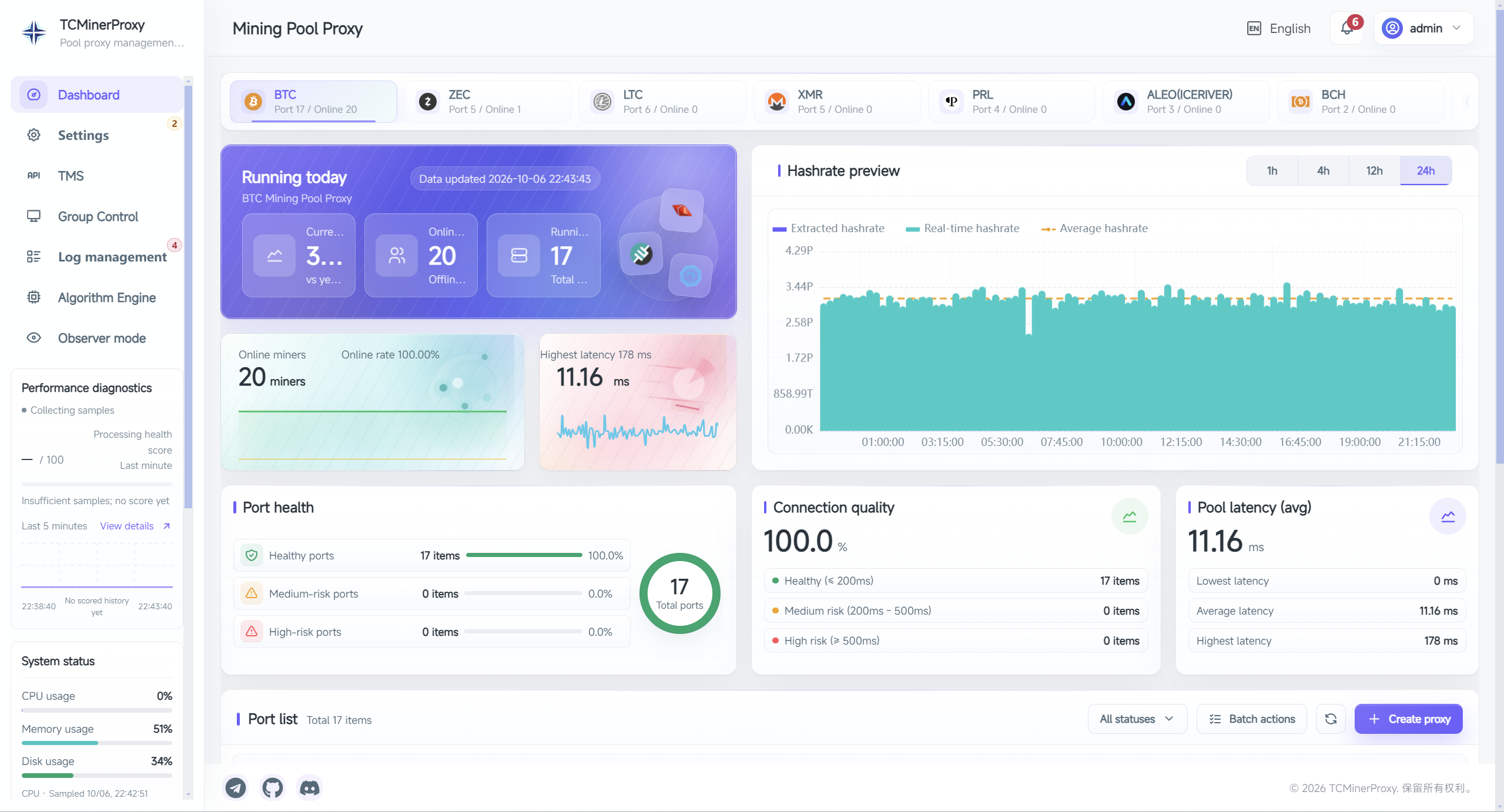
TCMinerProxy is mining pool relay proxy and management software for miners, mining farms and node operators. When direct pool connections from a region are unstable or unavailable, it can run on a nearby cloud server with reliable access to the target pool: miners connect to that relay, and the server connects to the pool. It also provides port, wallet and worker rules, connection status, hashrate statistics and logs. Its position in that path is the starting point for understanding a MinerProxy or Stratum proxy deployment.
This guide brings together the product overview, proxy fundamentals, connection choices and safe deployment practices. It helps operators in different regions decide whether they need TCMinerProxy, when to add TMS and when to consider PoolNode. Exact settings depend on the installed version and its documentation. This is not a benchmark report or a promise of higher physical hashrate or mining income.
The cover is a product screenshot of the English TCMinerProxy dashboard, showing hashrate charts, online miners, port health and pool latency. Its values reflect the interface at the time of capture, not a capacity, reliability or income guarantee.
What is TCMinerProxy, and who is it for?
TCMinerProxy brings separate miner connections into a centrally managed server. Miners connect to a configured proxy port; the server connects to the selected upstream pool using the relevant coin, protocol and wallet rules. Operators can monitor ports and workers in one interface and manage upstream settings without treating every change as a device-by-device task.
Typical reasons to use it include:
- Direct pool connections from a region time out, disconnect frequently or cannot be established, requiring an alternative path through a nearby cloud server.
- A farm needs consistent entry points for multiple pools, wallets or customer subaccounts.
- Several sites need a common operating process while keeping ports separated by region, coin or customer.
- Operators need a central view of online workers, disconnects, rejected shares and server resources.
- Developers want to integrate port, wallet and worker data into their own platform.
- Node operators plan to provide user-facing services through PoolNode.
A proxy is not mandatory for every miner. Direct pool connections are often simpler for a small, stable setup without centralized management requirements. Adding a proxy also adds a service that must be secured, monitored and recoverable.
Core feature: relaying pool connections through a nearby cloud server
Mining pool relaying is a core TCMinerProxy use case. In some regions, the direct path from a farm to a target pool may be unstable, time out or fail to connect. A nearby cloud server that the farm can reliably reach, and that also has a good route to the pool, can host TCMinerProxy as a relay.
The path becomes: miner or farm → TCMinerProxy on a nearby cloud server → target mining pool.
For example, a farm may experience repeated disconnects when connecting directly to a pool, while its connection to a nearby cloud region is stable and that region can reach the pool normally. The relay provides an alternative path: miners use the server address and proxy port, and the server forwards mining jobs and share submissions. This can provide access where the direct route is unavailable, while centralizing pool addresses and backup settings. TMS is not required for this server-side relay setup.
Establishing the relay path
- Check the candidate cloud server from the farm, then check the pool's mining endpoint from that server. Verify the required ports and protocols on both links rather than relying on one ping result.
- Deploy the server using the TCMinerProxy installation guide, secure administrative access and allow only the necessary ports.
- Create a mining pool proxy port with the correct coin, listening protocol, target pool address and upstream protocol.
- Point a small set of miners at the cloud server's proxy address and port. Check wallets or subaccounts and worker names; keep the existing account configuration when identity replacement is not needed.
- Confirm online workers and accepted shares at the pool. Compare disconnects, rejection rate, latency and server resources before expanding in batches.
“Nearby” should reflect the actual network path and stability, not just geographic distance. Both farm-to-cloud and cloud-to-pool links must work. A relay alone cannot fix a pool outage, authentication failure or protocol mismatch. It offers an alternative connection path, not guaranteed connectivity or lower latency in every region and network.
Connection architecture: direct pools, server proxy and TMS
The three paths differ in components and operational responsibilities, not in a guaranteed income advantage.
| Connection model | Data path | Main purpose | What you maintain |
|---|---|---|---|
| Direct to pool | Miner → upstream pool | Simple access without central proxy rules | Device addresses, accounts and backup connections |
| TCMinerProxy server | Miner → TCMinerProxy → upstream pool | Pool relay access, central ports, wallet rules, monitoring and APIs | Server, access controls and upstream connections |
| With TMS | Miner → local TMS → TCMinerProxy → upstream pool | Local access, connection aggregation and encrypted compression | Local client, server and matching settings at both ends |
Stratum connections carry mining jobs, authentication and submitted shares. Protocol mismatches, incorrect identity mapping, reconnects and network delay can affect valid submissions along the proxy path. A connected status alone does not prove that the pool is accepting shares.
TCMinerProxy is not a general-purpose VPN: configuring a mining proxy port does not automatically route other application traffic. Forwarding connections to a third-party pool also does not create an independently operated pool settlement system.
How TCMinerProxy, TMS and PoolNode work together
| Component | Location and responsibility | When to use it |
|---|---|---|
| TCMinerProxy server | Manages proxy ports, upstream pools, wallets, statistics, security and APIs | When miner connections need central management |
| TMS client | Usually runs on the farm LAN and provides local access plus a compatible encrypted, compressed server link | When reducing public-network connections, compressing traffic or centralizing local access is useful |
| PoolNode | Organizes node groups, mining endpoints, a website, users and earnings queries within the TCMinerProxy system | When operating your own mining pool node service |
TMS is optional and does not replace the server. TMS3 and TMS3(Zstd) compression settings must match the server configuration. Measure traffic, CPU overhead and delay on the actual path; a fixed compression percentage is not a universal result.
PoolNode groups nodes with CODE/TOKEN and distinguishes shared group settings from local server settings. Its users, fees and earnings workflows differ from ordinary third-party pool proxying. Plan it separately with the PoolNode documentation, rather than treating a proxy port as a complete pool.
Main features: from proxy ports to central operations
Ports, pools and wallets
The proxy port configuration supports organizing entry points by coin, customer or purpose, with a target protocol, primary pool and backup pool. Test the actual upstream endpoint and check that the pool accepts the chosen wallet or subaccount format before rollout.
Wallet and worker rules control upstream identity and configured allocation percentages. Check the destination account, worker naming and pool requirements before changes; verify the result on the upstream pool afterwards, not just in the local interface.
Traditional efficient and lossless fee modes
The server offers a traditional efficient mode and a lossless fee mode with specific compatibility requirements. The current lossless mode applies to BTC and LTC on supported pools. Main and fee wallets must use the same pool platform; the fee endpoint and protocol follow the main pool, while wallets, worker names and percentages can be configured separately. Unsupported combinations cannot be assumed to work in this mode.
“Lossless” is a feature name, not a guarantee of zero loss under every network condition, miner firmware or configuration. Acceptance testing still needs valid-share, rejection and pool-side checks.
Fee hot updates versus wallet and worker replacement
These features have different effects. Fee hot updates can change supported fee settings without actively disconnecting miners. Lossless mode still requires the same pool platform and keeps the endpoint and protocol tied to the main pool.
Wallet and worker hot replacement uses combined wallet.device rules, with preserve-value placeholders, wildcard or multi-value matching and optional pool redirection. Matched miners are forced to reconnect; this is not an interruption-free change. Saving an edited proxy port can also restart that port.
Monitoring, offline retention and APIs
The dashboard and port details bring together connections, workers, estimated hashrate, logs and resource usage. Settings include retention of offline-miner records to help investigate intermittent disconnects; removing expired records does not disconnect online miners. Offline or hashrate-drop notifications require a working delivery channel as well as a configured trigger.
Remote management supports multi-instance operations. For integration with your own platform, start with the TCMinerProxy API documentation. Confirm authentication, permissions and error handling, and never embed management credentials in a public webpage or client-side code.
API integration: what you can query and control
The TCMinerProxy API connects proxy operational data and configuration actions to a hosting provider's own business backend. This overview covers every category of the site's API documentation, reviewed on 2026-10-07, separating read-only access, configuration changes and PoolNode business operations. It is not a live test of every endpoint or a claim that a turnkey hosting billing platform is included. Fields, permissions and availability depend on the running version and the relevant endpoint documentation.
Operational data: what you can query
| Query scope | Available information | Reference |
|---|---|---|
| System, coins and versions | Coin and algorithm configuration, OS, CPU/memory/disk, resource and traffic history, device counts, coin hashrate, local and remote versions, release notes, start time, instance UUID and mobile access status | System and versions |
| Ports and pools | Port lists, full configuration, running status, errors, connections, wallets and replacement rules; lossless-mode pool lists and port eligibility, plus a pool connectivity test | Ports and wallets |
| Customers, wallets and workers | Paginated workers filtered by wallet/subaccount and status; wallet summaries, online/offline counts, effective and fee hashrate, successful/failed shares, latency, disconnections, individual fee ratios, coin/port/worker charts and TCP connections | Workers and statistics |
| Logs and faults | Administrative operation, runtime and error logs, IP access/blocking records, wallet-list matches and worker connection faults; worker endpoints also expose port/connection-group logs and failed data streams | Security and logs |
| Read-only observer access | A separate X-OB-TOKEN queries coins, workers filtered by wallet/subaccount, worker charts, connection logs and failed data; it cannot modify ports or wallets |
Observer API |
| Multiple instances and live diagnostics | Documented group-control forwarding reads remote ports, statistics, resources, versions and start times; WebSocket subscribes/unsubscribes to a worker group's live Stratum data, with heartbeat and close messages | Group control, WebSocket |
Wallet statistics and pool settlement are different data sources: proxy-side effective hashrate and share records are not a customer's final payout. Read-only observer access also does not establish customer-level data isolation; a wallet filter is not authorization. Before exposing customer queries, verify the visible scope and, where necessary, enforce customer authentication and data filtering in your own backend.
Proxy operations: what you can change and control
| Control scope | Available actions | Operational boundaries |
|---|---|---|
| Proxy port lifecycle | Create, edit, start, stop, delete and bulk-import ports; set coin, listening port/protocol, primary/backup pools, upstream protocols, connection limits and operating mode | Editing may restart a port; stopping/deleting affects access; inspect per-item import failures |
| Advanced port settings | Where supported, configure hashrate protection, success-response behavior and delay, pool/firmware compatibility options, miner-kernel information replacement, KENC/SOCKS5 extensions and TMS3 compression | Support varies by mode; a forced success response is not evidence that the pool accepted a share; preserve reserved fields with unconfirmed meaning |
| Fee wallets and ratios | Add, edit or remove fee wallets and adjust wallet/subaccount, worker name and ratio; set wallet-specific or individual-worker ratios, restore defaults, and favorite/unfavorite wallets | Hot updates differ from full port edits; lossless-mode fee pool addresses and protocols must follow the primary pool |
| Wallet/worker replacement | Read, create and delete t=2 rules in wallet.device form, with multiple values, whole-side wildcards, preserve-value placeholders and optional pool redirection |
Rules cannot be edited in place: delete and recreate them; matching miners disconnect and reconnect, so this is not interruption-free |
| Notifications and shortcuts | Read/save offline notification and email settings, offline-worker record retention, and custom pool/wallet shortcuts | Delivery needs a working channel; expired offline records do not disconnect online miners; read and merge before saving complete objects |
| TMS and transport configuration | Read/save server-side TMS client configuration: pairing code, primary/backup addresses, port/upstream mappings, modes, title, announcements and information; read/set/reset the KENC key | TMS retains the protocol path /api/rms/config; coordinate both ends before changing transport settings or keys; this is not remote miner firmware management |
| Web security and access | Change the admin security path, Web port and HTTPS; upload mining-port certificates/private keys or restore built-in certificates; add/remove IP blacklist and wallet blacklist/allowlist entries | Changes may restart services, move the admin address or block connections; keep a recovery path for management access |
| Observer and group-control management | Enable/disable observer mode and read observer credentials; retrieve/rotate group-control credentials and add, update or delete remote-instance records | Observer credentials are not admin credentials; confirmed forwarding use is reading, not arbitrary remote writes |
| Engine and status maintenance | Request an algorithm-engine refresh and reset crash/startup-failure flags | Resetting a flag does not fix its cause and is not a server reboot, firmware upgrade or arbitrary command-execution API |
Request details are in Ports and wallets, Workers and statistics, System configuration and Security. This summary describes scope, not a replacement for field definitions and compatibility constraints.
PoolNode: projects, websites and revenue management
These capabilities belong to the built-in PoolNode management API and require the applicable project activation, account verification and business conditions. They are not settlement APIs for ordinary third-party pool proxying and cannot manage arbitrary external pool accounts.
| Module | Query capabilities | Control capabilities |
|---|---|---|
| Projects and nodes | Project status and coin fees, node ports, access regions/endpoints, latency, node statistics and synchronization status | Apply for, activate or deactivate a project; create/delete node ports and change a port's public mode and unified wallet |
| Website and APP | Website port, security path, public-access/TLS state, certificate type, website settings, templates/download status, APP communication address and invitation code | Change website port/path/public access/TLS, upload or reset website certificates, save logo/title/announcement settings, select/reset templates and save the APP communication address |
| Fees, revenue and subaccounts | Revenue summaries, reward/payout records, payout addresses and minimum amounts, small-balance withdrawal eligibility/history, subaccount lists and fee/rebate settings | Set node coin fees and revenue email; send verification mail and change payout address/minimum through verification; submit eligible small-balance withdrawal requests; set/reset subaccount fees and set/remove rebates |
See PoolNode project and website management and PoolNode fees, revenue and subaccounts. Project deactivation, payout-address changes and withdrawal submissions are sensitive actions: do not automatically resubmit after a timeout without checking the outcome. The separate PoolNode end-user API requires its own integration; do not mix its credentials with these management credentials.
Connecting a hosting business system
A practical integration maintains a customer → instance → port → wallet/subaccount → workers mapping in the provider's own system, then uses the API to retrieve the relevant statistics, execute approved changes and verify the outcome. For example, set a customer's individual fee ratio or create an authorized temporary wallet-replacement rule, then check ports, workers and logs to confirm the affected scope. The business system must also record the operator, approval basis and restoration history.
Customer login, fine-grained permissions, approval workflows, invoicing, electricity metering, arrears decisions and financial reconciliation remain responsibilities of that business system or other services. This API overview does not confirm miner power control, overclocking, temperature collection or repair-ticket endpoints. Ordinary operation logs are not a complete tamper-proof audit system. An integration API does not automatically supply those business capabilities.
Enabling access, credentials and safe requests
- Set
ENABLE_CONTROL_API=1inrust-config, restart, and obtain or generate the API Key in Settings → API. Key management belongs to the authenticated admin settings flow; do not assume unauthenticated callers can retrieve it. - Follow API authentication to exchange the Key for an Access Token. Send
X-ACCESS-TOKENon normal requests and retain the admin security path in the base URL. Tokens last approximately two hours; generating a new Token invalidates the old one, and rotating the Key invalidates the old Key and its Tokens. Multiple callers must coordinate rotation. - Treat the general Token as a high-privilege credential. The current documentation does not provide per-customer Keys or granular scopes. Keep credentials on a controlled backend and use HTTPS, source restrictions and rate limits. Manage observer, group-control and general API credentials separately.
- Read configuration and save the previous values before merging and writing changes; read back the result. Do not confuse a port record ID with its listening port number. Ratios generally use decimals from
0–1; follow each field definition. - Check both HTTP and business results, especially PoolNode
status, individual import errors and new addresses after service restarts. Reads can use bounded backoff retries; verify uncertain outcomes before repeating writes such as deletion, address changes or withdrawals. For WebSocket, also confirm the running version's handshake authentication and reverse-proxy configuration.
Do not automate legacy paths that are not documented as stable merely because they exist as frontend constants. Follow the module references and error-handling documentation for complete requests, live messages and compatibility behavior.
Hosting operations: service fees and customer wallet switching
For mining hosting providers, TCMinerProxy can support customer-specific ports, service-fee allocation and wallet changes as well as connectivity. Assign a dedicated port to each customer, or maintain an explicit mapping between customers, wallets or subaccounts, and workers, so operational changes have a defined scope.
Example: an agreed 2% hosting service fee
Suppose a hosting provider and its customer agree to a 2% proxy allocation for operational services. The provider can add its service-fee wallet or pool subaccount to the customer's port and set that percentage. In a simplified example with only this fee allocation and no individual overrides, the customer's configured remaining share is 98%.
The 2% is an illustrative business rate, not TCMinerProxy's official software fee. It also does not guarantee that final payouts split exactly 98:2: accepted shares, pool rules, software charges and other factors affect settlement. Electricity charges should be accounted for separately as agreed. In lossless mode, the service-fee wallet must still satisfy the supported-coin, supported-pool and same-platform requirements.
Customers can use different port defaults, or wallet-level and individual-miner percentages available in port details. The effective priority is individual miner > wallet > port default. Supported changes to the fee wallet and percentage can use fee hot updates without actively disconnecting miners because of that configuration save.
Example: centrally switching a wallet after unpaid electricity charges
Where the hosting agreement provides for this procedure, the customer has authorized it, and the unpaid amount and notice have been checked, the provider can use wallet and worker hot replacement to redirect that customer's future submissions to an agreed settlement wallet or pool subaccount. There is no need to log in to every miner to change its configuration.
The following names are fictional pool subaccounts, not real wallet addresses:
| Rule setting | Example | Effect |
|---|---|---|
| Match | customer_a.* |
Match only workers using customer A's original subaccount |
| Replacement | hosting_settlement.#{DEVICE} |
Use the agreed settlement subaccount while retaining each worker's name |
| Pool redirection | Disabled in this example | Keep the port's pool; the destination subaccount must be valid there |
In this context, “one-click switching” means submitting a central server-side rule instead of editing every miner. The actual interface still requires rule entry and confirmation of its scope. Matched miners are disconnected and use the new identity when they reconnect, so validate a small group first and schedule the change. Do not use *.* indiscriminately on a shared port, as it could also switch other customers.
This changes the upstream identity for subsequent connections. It does not transfer an existing pool balance or change the withdrawal address held by the pool. It is not a billing system that automatically detects overdue payments, reads electricity meters, creates invoices or collects money. Your own accounting process must establish the outstanding amount, any agreed offset and the restoration time.
Restoration after payment and operational records
- Before changing anything, retain the customer, port, original wallet, affected workers and rule details, and verify that the settlement subaccount works.
- After switching, check both device identities in port details and pool-side worker data; record the effective time and affected devices.
- Once payment is settled, delete the corresponding temporary replacement rule. After miners reconnect, confirm that their original identities are restored and that no other matching rule remains.
- Reconcile accounts against the actual effective period. Retain the operator, customer notices, switching time and restoration time for customer queries and internal review.
These are examples of using the available features, not a claim that automated electricity-payment reminders or settlement are built in. Clear, reviewable rules and a restoration procedure matter as much as the ability to switch wallets.
Checking coin and protocol compatibility
The coin name alone is not enough. Check miner firmware, mining algorithm, pool endpoint, username format, server version and listening protocol together. BTC and LTC, for example, use different algorithms; changing a proxy address does not convert hardware from one algorithm to another.
TCMinerProxy offers several listening options, including TCP, TLS/SSL and protocols used with TMS. Consult the current port interface and documentation for available coins and features. An available protocol does not imply identical statistics, wallet replacement and fee capabilities in every mode. Transparent proxying has its own feature boundaries.
TMS3 is not another name for Stratum V2, so it must not be treated as evidence of Stratum V2 support. Record the software version, miner model, upstream endpoint and protocol combination during your first test to create a repeatable compatibility checklist.
Planning deployment across regions
Global deployment starts with the complete network path: miner to server, then server to pool. A server's country or a single latency reading is not enough to judge it. Observe loss, jitter, reconnects and valid shares over time.
- One site: if direct pool access is unstable or unavailable, test nearby cloud regions reachable from the farm and able to reach the pool reliably. Check both links separately; an on-site server still needs an uplink that can reach the pool.
- Several regions: choose regional entry points from actual network measurements instead of routing every site through one distant location.
- Limited outbound connections or bandwidth: evaluate TMS while checking the local device's CPU, memory and recovery after power loss.
- Cloud deployment: review the provider's workload policy, traffic billing, security groups, system firewall and public addressing.
A hostname makes entry points easier to manage, but DNS changes do not automatically migrate established connections. Exercise backup endpoints, failover and reconnect behavior. Adding a second server alone does not create high availability.
Linux and Windows: installation to the first accepted shares
Server downloads are available for Linux and Windows. Select the appropriate current package on the TCMinerProxy server download page, then follow the Linux and Windows installation guide. This overview links to the maintained instructions rather than duplicating commands that may change with the installer.
- Confirm the system, software version, server address, pool account and allowed access to management and mining ports.
- Obtain official software. Inspect the origin and contents of installation scripts before executing them; do not trust a forwarded command solely because it is convenient.
- Replace default credentials on first login, configure the security access path, enable two-factor authentication and retain recovery information.
- Create one test proxy port with the correct coin, protocol, upstream pool and wallet rules.
- Connect a small set of miners and check server logs, pool workers and accepted shares together.
- If TMS is needed, obtain it from the TMS secure-client download page, pair it using the TMS documentation, and compare operation before and after enabling it.
- Expand in batches, export configuration backups and retain original connection addresses and usable rollback steps.
Use the official TCMinerProxy releases and official TMS releases for current versions. Read release changes before upgrading and check configuration compatibility rather than only replacing the executable.
Security and capacity checks before rollout
Management access and mining ports serve different purposes and need separate access policies. Restrict administrative sources, use a controlled HTTPS management path and protect certificate keys and API credentials. A non-default URL can reduce accidental discovery, but it is not a substitute for authentication or a firewall.
Miner-to-proxy and proxy-to-pool connections are separate links. Encryption on one does not establish encryption on the other. Investigate hostname, chain and system-time problems when certificate validation fails rather than disabling validation permanently. See security guidance and the settings center.
| Acceptance check | Evidence to retain |
|---|---|
| Valid connections | Device status, proxy logs, pool workers and accepted shares agree |
| Stability | Rejected and stale shares, disconnect counts and recovery time over comparable windows |
| Resource capacity | CPU, memory, connections, traffic and log growth, including before/after compression |
| Security boundaries | Management restrictions, two-factor authentication, certificates, API permissions and credential storage |
| Recovery | Configuration exports, version records, restore tests, backup endpoints and a bypass procedure |
One instantaneous hashrate screenshot cannot establish long-term performance. Devices, proxies and pools may use different estimation methods and time windows. Compare direct and proxy paths with the same equipment, pool, observation period and settings where possible, then increase load gradually.
Understanding fees, costs and income
Separate software charges, pool service fees, operator-configured fee allocations or node rates, and server, bandwidth and maintenance costs. Share allocation in ordinary proxy mode is not the same mechanism as PoolNode's node earnings workflow.
Consult About TCMinerProxy for current software fee information and check the selected mode and installed version. A proxy can centralize connection management, but it does not change the physical computing capacity of a miner or remove the effects of network difficulty, pool settlement rules or market prices on income.
Frequently asked questions
Can a cloud relay help when my region cannot reach the pool?
Yes, provided the farm can reach the cloud server and that server can connect to the target pool. Deploy TCMinerProxy as the relay, test a small group of miners and verify accepted shares at the pool. Geographic proximity or a connected status alone is not evidence of a stable end-to-end path.
Does TCMinerProxy require TMS?
No. Miners can connect directly to TCMinerProxy proxy ports. Evaluate the additional TMS component when you specifically need local access, connection aggregation or compressed transport.
Is TCMinerProxy itself a mining pool?
Ordinary proxy mode connects to existing third-party pools. For your own node endpoint, website, users and earnings queries, investigate PoolNode and its operational boundaries separately.
How many miners can one server handle?
There is no single number for every deployment. Capacity depends on protocol, coin, connection count, compression, hardware and upstream behavior. Use staged acceptance tests rather than choosing server specifications solely from a device count.
Do encrypted or lossless modes remove the need to monitor rejections?
No. Encryption protects a particular transport link, and lossless fee mode has compatibility conditions. Neither replaces compatibility checks, resource monitoring or verification of accepted shares at the pool.
Where should I start next?
Read the TCMinerProxy configuration and operations documentation, then validate one test port and a small group of miners. Continue with TMS documentation for a local secure link or PoolNode documentation for node operation. Establish a small, verifiable and recoverable deployment before expanding to more sites and equipment.