
Documentation
TCMinerProxy TMS Client Configuration
Maintain TMS local client push addresses, port mapping, encryption password, custom forwarding addresses, and client display information in TCMinerProxy.
TMS Client Configuration
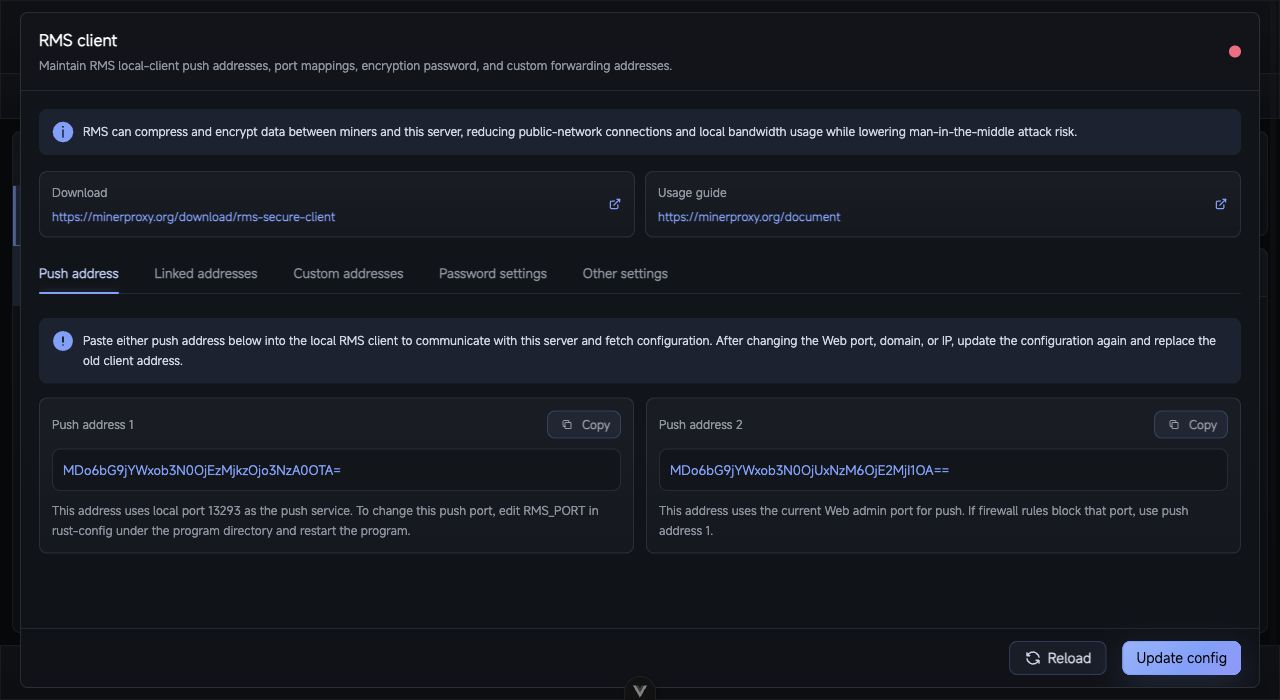
TMS Client: copy push addresses and synchronize local client port mappings, encryption password, and custom forwarding addresses.
The TMS menu manages how TMS local clients connect to this TCMinerProxy server. TMS compresses and encrypts miner-to-server traffic, reducing public connections and local bandwidth usage.
For deployment and capacity planning, read the TMS documentation.
Push Address
Copy a push address into the TMS local client so it can communicate with this server and fetch configuration. If the web port, domain, IP, HTTPS state, or safe route changes, replace the old push address in the client.
Linked Addresses
Linked addresses map server TMS protocol ports to local TMS client ports.
| Mode | Description |
|---|---|
| Default | The client opens the same local port as the server TMS port. |
| Custom | You can change the local listening port opened by the TMS client. |
If the list is empty, create an TMS2, TMS3, or TMS3(Zstd) proxy port first.
Custom Addresses
Custom addresses define additional local listeners and remote TMS peers. Each entry includes local port, coin, remark, super compression, compression level, and one or more remote addresses with protocol, host, port, and password.
Password and Display Info
The client password protects config sync and manual port connections. Public deployments should set one and keep manual client ports in sync.
The display section controls client-side software name, notice, and extra notes, useful for custom-branded deployments.
After saving, update the TMS local client, connect a few miners, and verify devices, hashrate, and connection logs in TCMinerProxy.